CL Theme Flexure
- 4.1
- Rating
- 10.00K
- Installs
- $2.49
- Price
 Analysis by App-foxy
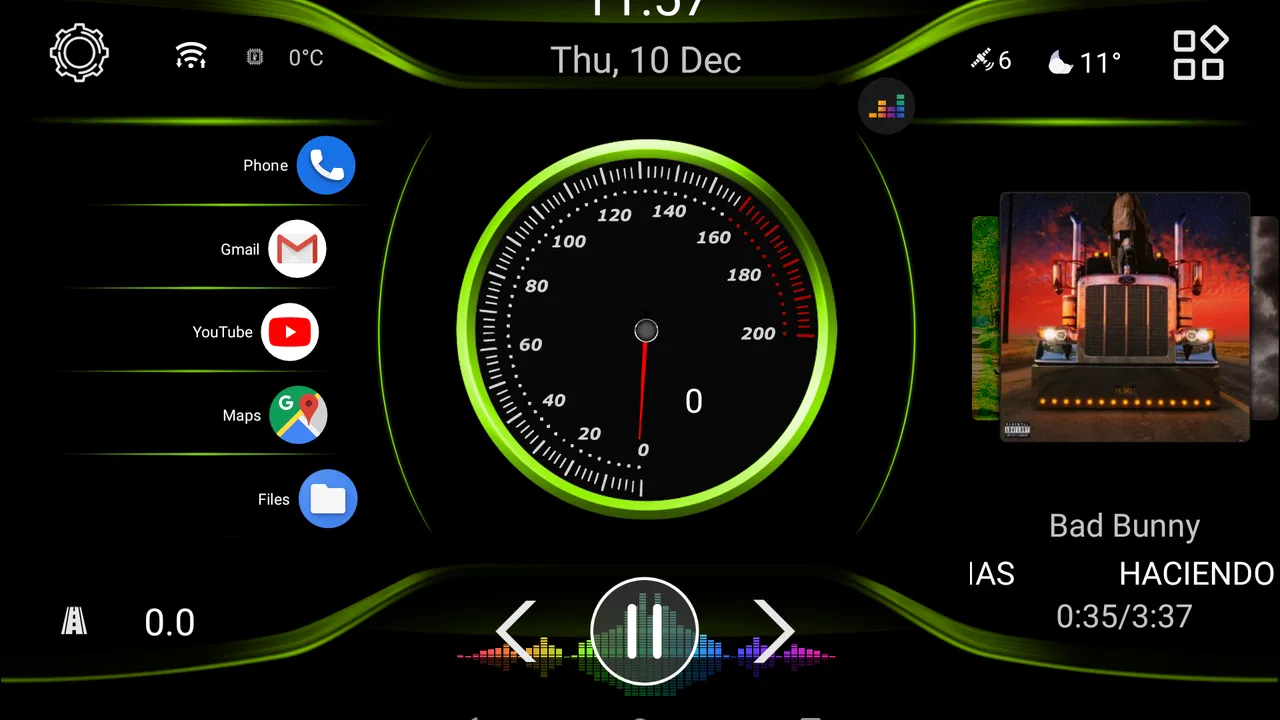
CL Theme Flexure is a focused visual add-on for drivers who already use Car Launcher 3+ and want the dashboard to feel more personal. I approached it as an everyday driving tool rather than a standalone navigation or vehicle-management app, and that distinction matters immediately: its value depends on how much you care about the appearance and consistency of your launcher screen. If you want a cleaner cockpit-style interface, this theme can be a pleasant upgrade. If you expect new navigation, music, or diagnostic functions, it is not the right purchase.
Developed by Apps LabDev, the app sits in the Auto & Vehicles category and is aimed at people who treat an Android head unit or phone-mounted dashboard as part of their regular driving setup. It costs $2.49, carries an Everyone content rating, and works with Android versions starting from 4.0. Its current version is 1.4, while the release date shown for it is December 10, 2020. Those details make it a small, inexpensive customization choice rather than a large platform with a broad feature set.
How I used the theme in a normal driving setup
My first step was to think about the launcher before changing anything. A theme is most useful when it supports a repeatable routine: start the car, glance at the dashboard, tap the same few controls, and keep attention on the road. CL Theme Flexure works best in that context. I would not install it simply to admire a new screen once; I would install it when the existing Car Launcher 3+ layout felt visually tired or made common controls harder to recognize.
You May Also Like

 Blood Strike: 2.5 Anniversary
Blood Strike’s Loadouts Turn Every Drop Into a Tactical Gamble
A close look at Blood Strike’s custom loadouts: how fast access to signature weapons reshapes its battle royale rhythm, rewards preparation, and narrows the gap between fights.

 Pandora - Music & Podcasts
Pandora’s Music Is Easy to Start, but Harder to Recover
Pandora’s strength is its low-effort path from a seed to a station. Its weak spot is how much confidence it asks you to place in connection, setup, and quiet recovery.

 8 Ball Pool
 Is Built on Rivalries, Rematches, and Routine
A close look at the rivalries, rematches, shared routines, and unanswered safety questions that turn a quick pool match into a persistent mobile community.

 Samsung Music
’s Quiet Strength Is Playing What You Already Own
Its reach comes less from spectacle than from dependable access to a personal library. That simplicity is both the app’s strongest retention engine and its ceiling.

 AccuWeather: Weather Radar
AccuWeather Review: A Quick, Clear Forecast for Everyday Decisions
For everyday plans, the best forecast is the one you can understand quickly. AccuWeather makes rain timing, radar, and local conditions easy to act on, with a few trade-offs.

 Hill Climb Racing
Why Hill Climb Racing Still Turns Crashes Into One More Run
A tiny car, a bumpy hill and one more upgrade: Hill Climb Racing keeps resurfacing because its simple chaos makes every near-miss feel personal.
More From Our News Desk
View All News


The baseline workflow is straightforward. I treated the theme as a layer for the launcher rather than as a replacement for the apps already used for directions, audio, calls, or vehicle information. That helped me judge it fairly. The theme can influence how the dashboard feels and how quickly I recognize areas of the interface, but it does not turn the launcher into a different navigation service. Keeping that boundary clear prevents disappointment and makes the purchase easier to evaluate.
For a realistic example, imagine leaving home for work with a phone connected to the car display. The useful habit is not repeatedly opening the theme application. Instead, I would set the visual arrangement once, check that the launcher remains readable in the parked car, and then use the same dashboard every morning. A consistent appearance can reduce the small hesitation that comes from searching for familiar controls after every layout change. That is a modest benefit, but it is the kind of benefit a theme can genuinely provide.
The most important compatibility question is whether Car Launcher 3+ is already part of your setup. The store summary identifies this product as a theme for that launcher, so it should be considered an accessory to an existing application, not a complete dashboard on its own. Someone using a different launcher will gain little from buying it. In that situation, a theme made for the launcher already installed would be a better choice, even if its visual style were less attractive.
I also recommend applying a new theme while parked, with the display at the brightness normally used for driving. A design that looks balanced in a bright room may feel too busy at night, while a dark-looking arrangement may lose important visual separation during the day. This is not a special feature of Flexure; it is a practical way to judge any dashboard theme without making changes during a journey.
What the visual change is actually good for
The strongest reason to use Flexure is visual coherence. A launcher theme can make a mixed collection of shortcuts and vehicle controls feel like one dashboard instead of a group of unrelated icons. That matters most on larger in-car displays, where an inconsistent layout can look unfinished. On a small phone screen, the benefit is more personal and may be less noticeable because there is less room for the design to breathe.
I found the theme easier to justify for a dedicated car device than for a phone used for many unrelated tasks. A dedicated display benefits from a stable identity: the same screen is associated with driving, audio, and quick access. On a general-purpose phone, switching between a launcher theme and ordinary phone use can make the customization feel less central. This is one of the main trade-offs before paying for it.
There is also a useful psychological advantage to keeping the dashboard unchanged for a while. Experienced users often avoid rebuilding their setup every few days because visual memory is valuable in a car. Once the positions and appearance become familiar, quick glances are easier than deliberate searching. Flexure is therefore more appealing to someone who wants to settle on one look and build a habit around it than to someone who enjoys constant experimentation.
Settings I would check before daily use
I would begin by checking the theme selection inside Car Launcher 3+ and then review the launcher’s own arrangement options. The key question is not whether every element can be made perfect, but whether the theme remains comfortable with the shortcuts and information panels I actually use. A theme can look attractive in isolation and become less useful when a personal shortcut label, music control, or navigation entry occupies an unexpected amount of space.
Before driving, I would verify three things: that the most-used controls are visually distinct, that text remains readable without leaning toward the display, and that the layout does not encourage unnecessary tapping. These checks are especially important for a dashboard theme because a decorative improvement is not worthwhile if it reduces glanceability. Readability should win over visual novelty every time.
Another worthwhile check is consistency between the theme and the launcher’s background or color choices. If the launcher permits additional appearance adjustments, I would change one setting at a time and then stop when the interface feels calm. Combining too many contrasting colors can make a theme look less like a deliberate dashboard and more like a collection of modifications. The safest workflow is to establish the Flexure look first, then make only small adjustments that solve a specific visibility problem.
I would also check the setup after connecting the device to the car, not only while holding the phone indoors. Reflections, viewing angle, and automatic brightness can change how the theme feels. If the device is mounted low or far from the driver, dense visual details become less useful. In that case, I would favor the clearest available arrangement and avoid filling the launcher with shortcuts simply because there is room for them.
One practical habit is to take note of the original launcher arrangement before applying a new theme. I do not mean making a complicated backup system; a quick mental or written record of the main shortcuts is enough. It gives me a reference point if the new appearance feels unfamiliar. This also makes testing more disciplined: I can compare the same daily controls instead of judging only the novelty of the new design.
Faster patterns for people who drive often
The quickest way to get value from Flexure is to organize the dashboard around frequency rather than category. The shortcut used several times per trip deserves the easiest visual recognition. A rarely used tool can stay secondary, even if it seems important in theory. This approach avoids a common mistake with themed launchers: arranging items according to what looks symmetrical rather than according to what the driver actually reaches for.
I would build the setup around a small set of repeatable actions. For example, the first glance might confirm the dashboard state, the next tap might open directions, and a separate familiar area might handle audio. The exact applications are up to the user and are not supplied by the theme itself. What Flexure contributes is the visual environment in which those habits take place. The theme is most successful when it disappears into the routine instead of demanding attention.
Another useful pattern is to keep the same arrangement for a full set of regular journeys before deciding whether it works. A short test in the driveway can reveal obvious problems, but repeated use exposes different issues: whether a label is easy to identify when moving, whether a favorite shortcut is too close to another control, and whether the colors remain comfortable after dark. I would make changes only after noticing a repeated friction point.
For drivers who share a car, the decision becomes more complicated. A personal theme may feel excellent to one person and unfamiliar to another. In that case, I would prioritize clarity over personalization and explain the main locations before relying on the layout. Flexure can still provide a tidy appearance, but a shared vehicle reduces the benefit of a highly individualized dashboard. A neutral, familiar launcher may be preferable if several people use the same display.
The same reasoning applies to older hardware. Because the app supports Android versions beginning with 4.0, it is relevant to users with older devices, but compatibility alone does not guarantee that every car display will feel equally responsive. I would avoid adding unnecessary visual complexity around the theme and would judge the complete launcher setup on the actual device. If the dashboard feels slow or awkward, a simpler appearance may be more valuable than a more distinctive one.
Where the customization reaches its limits
The main limitation is scope. CL Theme Flexure changes the presentation of Car Launcher 3+; it is not a replacement for a navigation app, a music service, a hands-free calling system, or a vehicle diagnostic tool. That means its usefulness is tied to the quality and flexibility of the launcher underneath it. If the base launcher does not match your preferred workflow, a theme alone will not solve that mismatch.
There is also a risk of confusing visual polish with functional improvement. A more attractive dashboard may make the device feel newer, but it does not automatically make routes better, audio controls safer, or information more accurate. I would buy Flexure for the atmosphere and organization of the launcher, not for promises about driving capability. This distinction is particularly important for anyone comparing it with a full-featured car interface.
Users who want extensive customization should consider the trade-off carefully. A dedicated theme can provide a more unified look than assembling individual widgets and icons, but it may not offer the same freedom as building a layout from scratch. Conversely, a completely custom arrangement can take longer to create and may lose the visual consistency that makes a theme appealing. Flexure sits on the side of quicker, more cohesive styling rather than unlimited design control.
The price also changes how I judge it. At $2.49, the purchase is relatively easy to justify for someone who uses Car Launcher 3+ every day and cares about the display. It is harder to recommend to a casual user who opens the launcher only occasionally. Infrequent drivers may notice the new look but receive little practical benefit from it. The best value comes from repeated exposure to the same dashboard, not from a one-time installation.
The app’s store presence shows a 4.1 average from around 48 ratings, with around two written reviews, and over 10 thousand installs. I read that as a sign of a small, specialized product rather than a mainstream automotive platform. The rating suggests that many users find the concept worthwhile, while the limited written discussion means prospective buyers should make the decision based on compatibility and personal use rather than expecting a large body of community guidance.
Who should install it, and who should skip it
I would recommend Flexure to an existing Car Launcher 3+ user who wants a more deliberate dashboard appearance and is comfortable spending a small amount to improve the feel of a dedicated car screen. It is especially suitable for people who like stable arrangements, repeat the same driving routines, and prefer a ready-made visual direction over designing every element themselves.
I would be more cautious if you are still choosing a launcher. In that situation, selecting the launcher should come first, because this theme does not remove the need for Car Launcher 3+. I would also skip it if your priority is live vehicle data, navigation quality, voice control, or media features. Those needs belong to the underlying applications and hardware, not to a visual theme.
It may also be the wrong choice for someone who changes phones or car displays frequently. A theme purchase makes more sense when the device and launcher remain part of a stable setup. If your dashboard is temporary, or if you prefer changing the entire interface often, the cohesion of Flexure may not have enough time to become useful.
For a family car, I would test it with every regular driver before settling on it. If one person finds the design attractive but another struggles to locate controls, the visual gain is not worth the shared inconvenience. The right dashboard is the one everyone can understand quickly, even if it is less distinctive.
My verdict after treating it as a long-term dashboard choice
CL Theme Flexure is a narrowly focused app, and I think that is both its strength and its limitation. It does not pretend to be an all-in-one automotive solution; it gives Car Launcher 3+ a different visual identity and can make a dedicated dashboard feel more intentional. Used with a stable arrangement and sensible shortcuts, it supports the kind of repeatable driving habit that experienced users value.
I would not describe it as essential. The standard launcher appearance may be perfectly adequate, and a different theme or a manually built layout may suit users who want more control. Flexure becomes worthwhile when the existing interface feels bland or visually disconnected, while the user prefers a finished theme instead of spending time assembling one.
My final advice is to decide based on the screen you use every day, not on the excitement of trying something new. Confirm that Car Launcher 3+ is already central to your setup, apply the theme while parked, check readability in both bright and dark conditions, and give the arrangement enough time to become familiar. If those conditions fit, the $2.49 price is reasonable for a small but noticeable dashboard refresh. If they do not, the better alternative is to improve the launcher workflow first or choose a solution designed around your actual automotive needs.
For me, the app earns a recommendation as a specialized visual upgrade rather than as a general driving application. Its best result comes from pairing a consistent theme with disciplined shortcut habits, not from expecting the theme to add functions it was never designed to provide. That makes it a sensible choice for the right Car Launcher 3+ user, while keeping the purchase easy to avoid for everyone else.
FAQs for CL Theme Flexure
01What is CL Theme Flexure, and what does it do?
CL Theme Flexure is a customization theme designed for compatible Android launcher or home-screen environments. It changes the visual appearance of supported interface elements, such as icons, wallpapers, colors, and other theme components. Before downloading, check the app’s description and compatibility details carefully, because the theme may not function independently and could require a specific launcher or customization platform.
02Which devices and launchers are compatible with CL Theme Flexure?
Compatibility depends on the version of Android, the device manufacturer, and the launcher or theme engine installed on your phone. CL Theme Flexure may work only with selected launchers rather than the default home screen. I recommend checking the developer’s compatibility list and reading recent user reviews before installing, especially if you use a heavily customized interface or a newer Android version.
03How do I apply CL Theme Flexure after installing it?
After installation, open your launcher or theme-management application and look for the installed themes section. Select CL Theme Flexure, then apply the available elements, such as the icon pack, wallpaper, or complete visual style. The exact steps vary between launchers. If the theme does not appear immediately, restarting the launcher or checking its manual import and theme settings may help.
04Does CL Theme Flexure require any special permissions or an internet connection?
Theme applications commonly need permission to set wallpapers or access launcher-related customization features, but the exact requirements can vary by device and installation source. Review the permissions shown before accepting the download. An internet connection may be necessary to obtain the app initially or download additional assets, while applying the already installed theme may work offline.
05Is CL Theme Flexure free, and can I uninstall it safely?
The availability and pricing of CL Theme Flexure may depend on the store listing and the version offered by the developer. Check whether the download includes advertising, optional purchases, or additional content before installing. You can normally uninstall the theme like any other Android application. If it is currently applied, switch back to your previous theme first to avoid losing your preferred visual settings.
Pros
- Supports flexible customization for a more personal home-screen style.
- Works well for users who enjoy experimenting with different visual layouts.
- Can complement compatible launchers with a cohesive themed appearance.
- Offers an alternative to standard
- preinstalled device themes.
- Lightweight theme-focused design should be easy to browse and apply.
Cons
- Compatibility may vary depending on the launcher and Android version.
- Some features may require a separately installed launcher or theme engine.
- Customization options can feel limited compared with full launcher apps.
- Theme previews may not perfectly reflect how icons look on every device.
- Updates and support may be less frequent than with larger theme platforms.

CL Theme Flexure
Gallery